


Popup Window
axPopupWindow
Description
This eXtension allows you to customize the position, size and style of a 5250 window. This eXtension applies to the TS2 engine only.
Properties
|
Name |
Description and Comments |
JavaScript |
Shipped default |
|---|---|---|---|
|
backgroundStyle |
Additional style properties that should be applied to the window. |
Yes. Must return a valid style object. |
None |
|
headerText |
The popup window header text that will be displayed. |
Yes. Must return a string. |
None |
|
style |
Additional style properties that should be applied to the window. |
Yes. Must return a valid style object. |
None |
|
type |
Defines the popup behaviour when displayed. The values are -1, 0, 1, 2, and 3. |
No |
-1 |
|
windowHeight |
The height of the window in pixels. A negative value indicates that the height specified by the host application should be used. |
Yes |
-1 |
|
windowLeft |
The position, in pixels, of the left edge of the window. A negative value indicates that the position specified by the host application should be used. |
Yes |
-1 |
|
windowTop |
The position, in pixels, of the top of the window. A negative value indicates that the position specified by the host application should be used. |
Yes |
-1 |
|
windowWidth |
The width of the window in pixels. A negative value indicates that the width specified by the host application should be used. |
Yes |
-1 |
Notes, Comments and Warnings
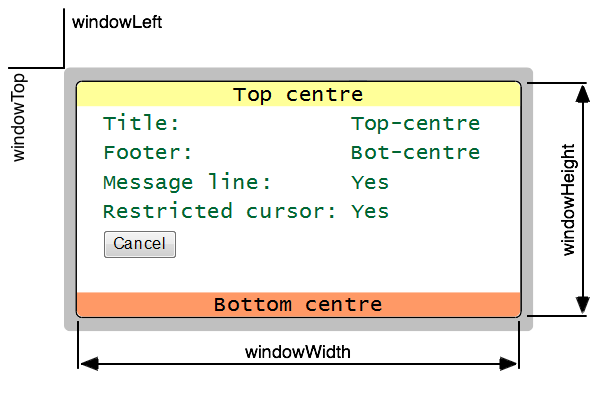
TS2 windows are constructed using two boxes. A gray, slightly transparent (on browsers that support it) box provides a clearly visible border that separates the window from the background. Inside it is another box that provides a solid border to the window, has a white background, and contains any headers or footers specified by the host application.
To maintain backward compatibility with TS1 windows, the contents of the window are not placed inside the background box. They are placed inside the gray window box and the background is then positioned behind them. This is important to understand when applying styles. Inherited styles like font settings applied to the background will not be inherited by the window contents.
The windowTop and windowLeft properties define the position of the top left corner of the window. The windowWidth and windowHeight properties define the size of the content area inside all borders.
See Also
FAQ - 5250 Popups - PopUp Windows and Screen Rendering in aXes-TS2.
