axHTML
Description
axHTML allows a raw HTML string to be inserted into a 5250 screen.
Usability
|
Context |
Supported |
|---|---|
|
Input screen fields |
No |
|
Output screen fields |
No |
|
Input subfile fields |
No |
|
Output subfile fields |
No |
|
New screen elements |
Yes |
Properties
|
Name |
Description and Comments |
JavaScript |
Shipped default |
|---|---|---|---|
|
html |
Specifies a string or JavaScript code that defines the HTML element definition(s) to be inserted into the screen. For example: <div>Hello</div> or <table><tr><td>123</td></tr><tr> td>456</td></tr></table>. |
Yes. Must return a string. |
None. |
|
onScreenReady |
JavaScript code that is to be executed every time layout render of all extension is completed. |
Yes |
None |
|
style |
Additional style properties that should be applied to the <div> container of the HTML elements defined by the html property. |
Yes. Must return a valid style object. |
None. |
Notes, Comments and Warnings
None.
Examples
This simple string …
<p style="color:red;font-size:48pt;">Hello World</p>
should produce a display like this …

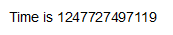
This executable JavaScript …
var oDate = new Date();
var sResult = "<div>Time is " + oDate.getTime().toString() + "</div>";
ENV.returnValue = sResult;
should produce a display like this …
Specify this code in the onScreenReady property:
TRACE("**** MY ONREADY CODE IS EXECUTING. ****");
Now execute your aXes application with trace mode turned on.
You should see trace statements indicating that your code has been executed.