Description
An application may contain a collection of named styles.
Named styles are designed to overcome a common problem ….
Imagine that you decide that customized screens should display the most commonly used push button with a pale orange background. You have 50 screens and set about changing the style property for the most commonly used push button on each screen to #FF9933 - a pleasant shade of orange. Just after you finish, your marketing manager takes a look and declares that the shade of orange is "completely wrong" and that a pale yellow needs to be used instead. You now need to change 50 screen definitions, and risk having to do it again next week when the fickle marketing manager changes her mind yet again.The solution is to define an application style named "PrimaryButton" (say) that defines the color, and possibly other characteristics of the button. Then on each individual button you indicate that the style to be used is "PrimaryButton", instead of using a specific color. Next time the marketing manager changes her mind, you can implement a simple change to the application's "PrimaryButton" style - all the buttons on all 50 screens will change instantly.
Understanding the benefits of this approach, and being quite wary of the fickle marketing manager, you will also understand why:
· Naming the application style "YellowButton" is a bad idea.
· Creating a style named "SecondaryButton" for all the other buttons is a good idea.
Properties - version 4.20
|
Name |
Description and Comments |
JavaScript |
Shipped default |
|---|---|---|---|
|
appStylesTheme |
Specifies which theme to apply. The values are Basic, JQueryUI and Material Design. |
No |
JQueryUI |
|
interface |
The format of the interface of which the style will be saved. Either as a list or Jason data. |
No |
List |
|
jqueryTheme |
Set of JQuery themes available to use. Additional items can be added by downloading and adding the folder into the project’s JQuery theme folder. The jQuery theme folder is located at \ts\screens \<projectname>\projectThemes folder. Available when appStylesTheme is set to JQueryUI only. |
Yes. Must return String. |
Default (redmond) |
|
mdTheme |
Set of Material Design themes available to use. Additional items can be added by creating a theme in Material Design Theme generator tool and exporting it to the project. The Material Design theme folder is located at \ts\screens \<projectname>\mdThemes folder. Available when appStylesTheme is set to Material Design only. |
Yes. Must return String. |
Default (blue) |
|
styles |
Style collection. Each style in the collection has their own properties (see next table). |
No |
None |
Properties - version 3.11 ~ 4.11
|
Name |
Description and Comments |
JavaScript |
Shipped default |
|---|---|---|---|
|
interface |
The format of the interface of which the style will be saved. Either as a list or Jason data. |
No. |
List. |
|
jqueryTheme |
Set of JQuery themes available to use. Additional items can be added by downloading and adding the folder into the project’s JQuery theme folder. The jQuery theme folder is located at \ts\screens \<projectname>\projectThemes folder. |
Yes. Must return String. |
Default. (redmond) |
|
styles |
Style collection. Each style in the collection has their own properties (see next table). |
No. |
None. |
|
useJQueryExtensions |
When checked, it enables the use of JQuery themes. When false, the setting in jqueryTheme will be ignored. |
Yes. Must return bool. |
False. |
Properties of Style Item
|
Name |
Description and Comments |
JavaScript |
Shipped default |
|---|---|---|---|
|
for5250Attributes |
Any display attributes specified here will cause the style to be applied when a field with one of these attributes is encountered. This can be used, for example, to make fields in error appear differently to other input fields. Multiple display attributes can be specified for this property |
No |
None |
|
htmlTag |
Applicable only if styleFor attribute is set to Specified HTML Tag. |
No |
None |
|
name |
The symbolic name of the application style. |
No |
None |
|
style |
The style details that define the style. |
No |
None |
|
styleFor |
If specified this style will automatically be applied to the specified element. Possible values for this property: Blank – the style will not be applied automatically to an element. To apply this style to an element you need to refer to this style from that element. All – the style applies to everything unconditionally. This is useful for specifying things such as font styles that should be consistent across the whole application. Application Window – the style applies to the main browser window. Most common use of this is to change the window background color or image. Specified HTML Tag – the style applies to the HTML tag specified in the htmlTag (see the next entry in the table) property. Note that this is an advanced feature and you should not attempt to use this unless you are familiar with Cascading Style Sheet. |
No |
None |
|
theme |
The name of the theme to relate the defined styles items. |
No |
None |
Style Inheritance
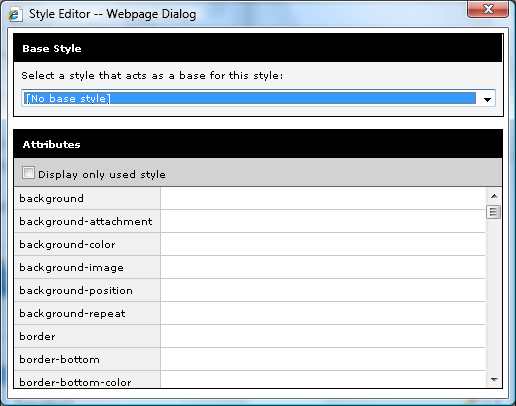
A style can be based on another style – so if later you change some attributes in the base style, the inheriting style will immediately inherit those changes as well.
It is recommended that you design your styles in this fashion so as to avoid duplications and to make maintaining your styles easier.

See Also